

CAMWorks is CAM software used to prepare CNC machining workflows from CAD model data. It helps manufacturers create toolpaths, define machining strategies and connect design information with production requirements. For businesses that need more advanced machining capability, CAMWorks provides tools that support a more structured and automated approach to CNC programming.
CAMWorks is often used by teams that need to improve the connection between engineering and manufacturing. By working closely with CAD geometry and manufacturing features, CAMWorks helps reduce duplicated setup work, support consistent programming practices and improve machining preparation before work reaches the shop floor.
Highlights:
CNC programming can become time-consuming when manufacturing teams rely on disconnected data, repeated manual setup or inconsistent machining processes. CAMWorks helps teams create a more connected and repeatable CAM workflow, making it easier to move from design data to production-ready machining instructions.
CAMWorks helps teams prepare CNC machining workflows more efficiently by using model data and manufacturing features to support toolpath creation. This can reduce repeated setup work and help programmers work from clearer design information.
Key points:
CAMWorks supports a connected CAD/CAM process by linking machining preparation more closely to design geometry. This helps manufacturing teams work from up-to-date product information and reduce gaps between engineering and production.
Key points:
Consistent machining standards help teams improve repeatability and reduce variation between programmers, parts and projects. CAMWorks supports more structured CAM processes by helping businesses apply repeatable machining strategies.
Key points:
CAMWorks includes tools that support CNC programming, machining strategy development and production preparation. These capabilities help businesses manage more advanced manufacturing workflows while keeping machining data connected to CAD geometry.

CAMWorks supports feature-based machining workflows that help identify machinable features and apply machining strategies more consistently. This helps programmers reduce repeated manual decisions and create more structured CAM processes.
Key points:
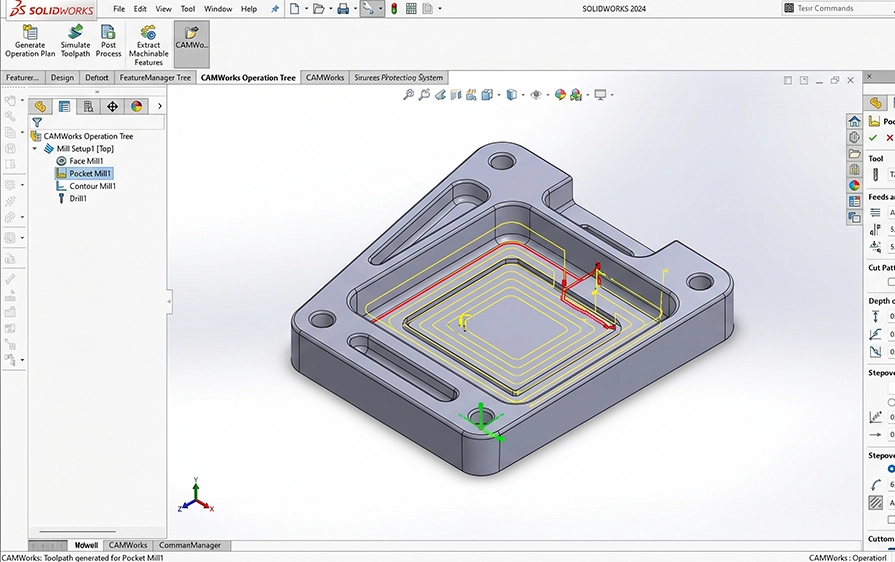
Create toolpaths and machining operations for CNC manufacturing workflows. CAMWorks helps users prepare parts for production by turning CAD model information into machining data that supports the shop floor.
Key points:

CAMWorks can support a range of machining requirements depending on the selected package and configuration. Cadmes can help confirm the correct CAMWorks option based on your milling, turning or more advanced machining needs.
Key points:

CAMWorks supports knowledge-based machining, helping teams capture and reuse machining strategies across similar parts and processes. This can improve consistency and reduce reliance on repeated manual setup.
Key points:
CAMWorks is useful for manufacturers that need to prepare CNC machining workflows from CAD data. It supports teams involved in milling, turning, production planning, CNC programming and advanced manufacturing preparation.
Prepare machining operations and toolpaths for parts that need to move from CAD design to CNC production.
Support milling operations for components that require structured toolpath and machining strategy preparation.
Support turning-related CNC workflows where parts require lathe-based machining preparation.
Help teams manage more complex CAM requirements where repeatability, consistency and process control matter.
Reduce the gap between engineering design and production by keeping machining preparation connected to CAD data.
Feature-based CAM tools
Support for Rules-Based Machining
Tolerance-based Machining (TBM)
Knowledge-based Machining (KBM)
Associativity with SOLIDWORKS 3D CAD
Automatic Feature Recognition (AFR)
Additional capabilities include:
Advanced milling capabilities
3-axis toolpath support
Rules-Based Machining
Tolerance-based Machining (TBM)
Knowledge-based Machining (KBM)
Associativity with SOLIDWORKS 3D CAD
Automatic Feature Recognition (AFR)
Optimised for lathe operations
Rules-Based Machining
Tolerance-based Machining (TBM)
Knowledge-based Machining (KBM)
Associativity with SOLIDWORKS 3D CAD
Automatic Feature Recognition (AFR)
Enhanced feeds & speeds
Reduced cycle times
Extended tool life
Specifically designed for superior lathe performance
Complete CAM solution
Multiaxis milling capabilities
Rules-Based Machining
Tolerance-based Machining (TBM)
Knowledge-based Machining (KBM)
Associativity with SOLIDWORKS 3D CAD
Automatic Feature Recognition (AFR)
Comprehensive 4-axis capable Wire EDM module
Advanced wire cutting solutions
Seamlessly integrated with SOLIDWORKS 3D CAD
CAMWorks is a CAM software solution used to program CNC machines.
It works directly inside SOLIDWORKS, allowing users to create machining toolpaths using the same 3D model they designed.
This keeps design and manufacturing closely connected.
CAMWorks is a more advanced CAM solution.
It supports additional machining strategies, more machine types, and greater control over toolpaths.
SOLIDWORKS CAM is often used as an entry-level option, while CAMWorks is used when manufacturing requirements become more complex.
Yes. CAMWorks runs natively inside SOLIDWORKS.
There is no need to export files or work in a separate CAM system.
When the design changes, CAMWorks updates the machining features and toolpaths accordingly.
CAMWorks supports a wide range of machining, including 2.5-axis, 3-axis, 4-axis, and 5-axis milling, as well as turning and mill-turn operations.
This makes it suitable for more advanced CNC environments.
Yes. CAMWorks is built around feature-based machining.
It recognises machinable features from the model and applies predefined machining strategies automatically, reducing manual programming work.
Knowledge-based machining in CAMWorks allows users to store machining rules, tools, and strategies in a central database.
Once set up, CAMWorks applies these rules automatically, helping standardise CNC programming across teams.
Yes. CAMWorks generates CNC-ready G-code using post processors that can be configured for specific machines and controllers. This ensures the output is suitable for direct use on the shop floor.
Yes. CAMWorks is commonly used for complex parts that require multi-axis machining, tight tolerances, or repeatable production processes.
It is well suited for advanced manufacturing environments.
Yes. Cadmes provides local technical support for CAMWorks, assisting with setup, troubleshooting, and CNC-specific questions. This ensures users get help from a team familiar with local manufacturing needs.
Buying CAMWorks through Cadmes gives you access to local expertise, training, and ongoing support. This helps ensure CAMWorks is implemented correctly and delivers real value in day-to-day CNC operations.
CAMWorks helps manufacturing teams connect CAD data with CNC programming and advanced machining workflows. Cadmes can help you choose the right package, request pricing and implement CAMWorks in a way that supports your production requirements.