

SOLIDWORKS Composer is technical communication software that helps users create product documentation from 3D CAD data. It allows teams to produce assembly instructions, service manuals, training content, product visuals and interactive communication assets without waiting for the design process to be completely finished.
By using CAD data as the foundation for documentation, SOLIDWORKS Composer helps engineering, manufacturing, service and marketing teams explain complex products more clearly. This supports better communication between departments and helps businesses create more consistent technical content.
Highlights:
Product documentation can become slow and difficult to manage when teams rely on screenshots, disconnected files or manual updates. SOLIDWORKS Composer helps teams create clear documentation directly from 3D CAD data, making it easier to explain products, update content and support downstream teams.
SOLIDWORKS Composer allows documentation teams to begin creating technical content from CAD data before final production. This helps reduce waiting time between design completion and the creation of manuals, assembly guides or service documents.
Key points:
Clear visuals can help users understand complex assemblies, service steps and product details more quickly. SOLIDWORKS Composer helps teams create views, exploded illustrations and visual instructions that make product information easier to follow.
Key points:
Manual documentation workflows can create inconsistencies when designs change. SOLIDWORKS Composer helps teams work from CAD data and update documentation more efficiently, supporting better consistency across product communication materials.
Key points:
SOLIDWORKS Composer includes tools for creating technical illustrations, product visuals, assembly instructions and service documentation from 3D CAD data. These capabilities help teams communicate product information in a more visual and structured way.

Create clear assembly instructions using 3D model views, exploded states, callouts and step-by-step visuals. This helps production teams, technicians and customers understand how products and components fit together.
Key points:

Create service guides and maintenance documentation that explain part removal, component replacement and technical procedures more clearly. SOLIDWORKS Composer helps users communicate service workflows using visual content based on 3D design data.
Key points:
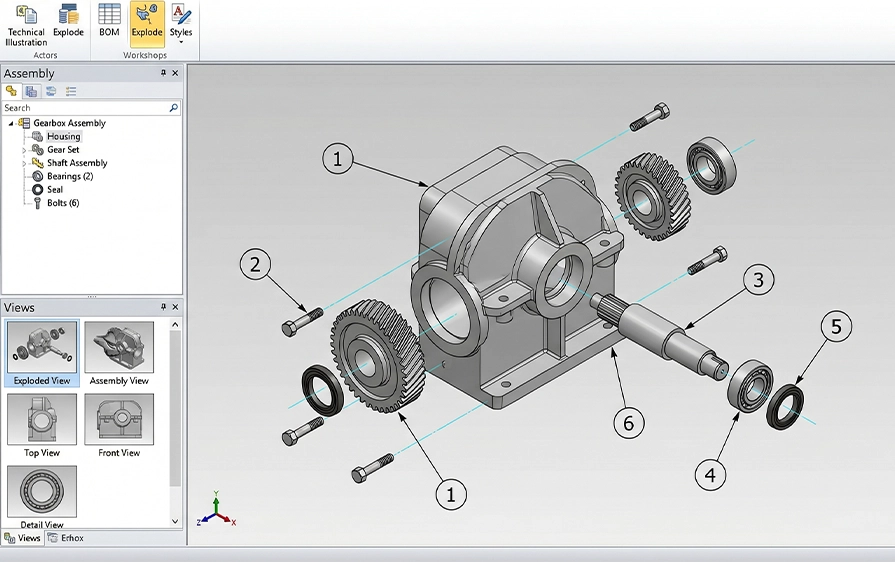
Generate exploded views, product illustrations and communication assets that help explain complex assemblies. These visuals can support manuals, training documents, product presentations and internal technical communication.
Key points:

Create interactive product communication content that helps users explore assemblies and understand technical information more effectively. Depending on the workflow, these outputs can support training, service and communication needs.
Key points:
SOLIDWORKS Composer is useful for teams that need to turn engineering data into clear product communication. It supports technical documentation, assembly, service, training, marketing and internal communication workflows where visual clarity matters.
Create visual assembly instructions that help production teams understand build steps and component relationships.
Develop service documentation that explains maintenance, inspection, repair and part replacement workflows.
Create visual learning content that helps users understand product structure, assembly steps or technical procedures.
Build clearer product manuals using CAD-based views, annotations, exploded visuals and technical details.
Create product visuals that help communicate design features, assembly structure and product value before physical photography is available.
CAD Format Supported
Update Visual Content
Faster Content Development
Document Processes
Create Animations
Customize BOMs
Automate Processes
SOLIDWORKS Composer is technical communication software that lets you use your 3D CAD models to create illustrations, animations, and product documentation like assembly instructions, exploded views, and interactive visuals.
It works with the original CAD data so your content stays up to date with design changes.
You can use SOLIDWORKS Composer to make high-quality 2D images, 3D graphics, animations, exploded views, and step-by-step instructions.
These can be used in manuals, marketing materials, training guides, and interactive outputs.
Yes. Composer imports and links to your SOLIDWORKS CAD models, so updates in the CAD design can be reflected in your Composer deliverables without re-creating them manually.
Composer can generate a range of outputs including high-resolution raster images (like JPG and PNG), vector files, animations (e.g., AVI), interactive web exports (HTML5), and 3D PDFs.
Yes. Because Composer links directly to CAD geometry and metadata, you can re-import updated CAD data so your documentation reflects the latest design without starting over.
Yes. Composer is often used to create product visuals, exploded animations, and illustrative graphics that can be used in marketing materials, presentations, and product launches.
Yes. Cadmes offers SOLIDWORKS Composer Training, where you learn how to use the software to create detailed illustrations, animations, and technical documentation from your CAD designs.
This training helps you work confidently with Composer for product manuals, marketing content, and service guides.
Yes. Cadmes provides local technical support for SOLIDWORKS Composer to help you with setup, workflows, and any questions you might have when producing documentation and visuals.
Yes. Cadmes can assist you with adopting Composer as part of your documentation and communication processes so you can produce consistent, high-quality outputs tied to your design data.
Buying SOLIDWORKS Composer through Cadmes gives you local support, training, and implementation help to ensure you use the software effectively for technical documentation, animations, and product communication.
SOLIDWORKS Composer helps teams create technical documentation, assembly instructions, service guides and product visuals from 3D CAD data. Cadmes can help you choose the right licence, request pricing and implement SOLIDWORKS Composer in a way that supports your documentation workflow.
