

SOLIDWORKS Electrical is electrical design software used to create schematics, manage electrical documentation and connect electrical design data with 3D product development workflows. It helps electrical and mechanical teams work from more consistent design information, reducing disconnected processes between schematic design and physical product layout.
The software supports electrical schematic creation, component management, wiring documentation, project collaboration and 3D electrical integration. This makes it useful for teams that need to improve electrical design accuracy, reduce manual documentation work and align electrical systems more closely with mechanical design.
Highlights:
Electrical design can become difficult to manage when schematics, wiring information, component data and mechanical layouts are handled separately. SOLIDWORKS Electrical helps teams bring these areas closer together, supporting more accurate documentation and better communication between electrical and mechanical departments.
SOLIDWORKS Electrical helps users create and manage electrical schematics with tools built for circuit documentation, project organisation and component information. This reduces the need for disconnected manual drafting and helps teams work with more structured electrical data.
Key points:
SOLIDWORKS Electrical helps connect 2D schematic design with 3D electrical system design, allowing electrical and mechanical teams to work from more consistent design information. This supports better alignment between wiring, components, routing and mechanical constraints.
Key points:
Accurate electrical documentation is important for manufacturing, assembly, maintenance and compliance-related workflows. SOLIDWORKS Electrical helps teams manage project data more consistently, reducing the risk of outdated drawings, manual errors and duplicated information.
Key points:
SOLIDWORKS Electrical includes tools for schematic design, electrical documentation, project management and integration with mechanical design. These capabilities help teams create clearer electrical deliverables and manage design information throughout the project.
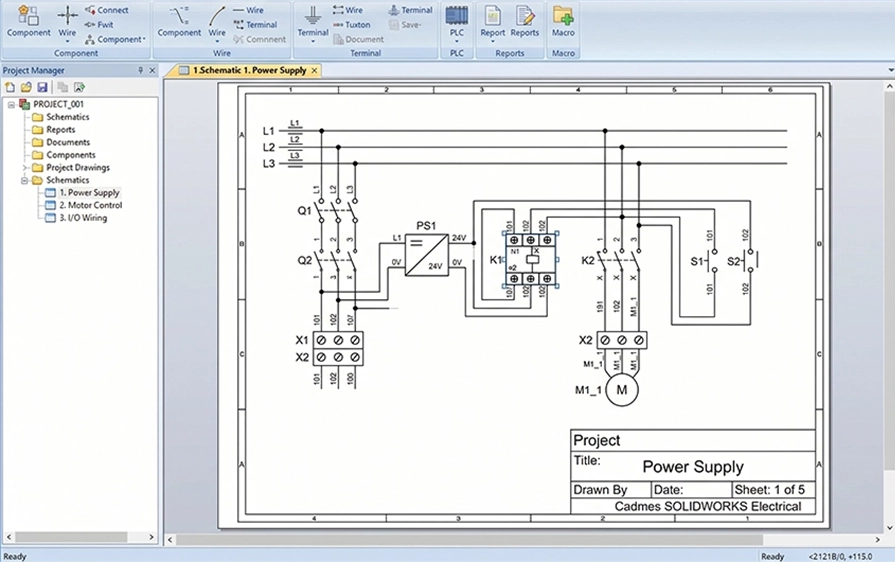
Create and manage electrical schematics using tools built for circuit design, symbols, wires, components and project documentation. This helps teams produce clearer electrical drawings and keep design information organised.
Key points:
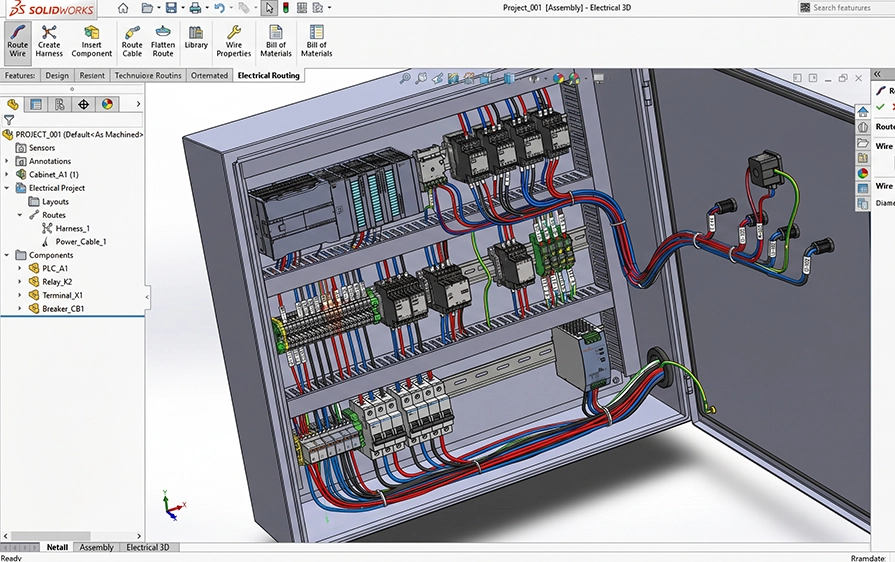
Connect electrical schematic information with 3D design workflows so teams can better understand how wiring, components and harnesses fit into the physical product. This helps align electrical design intent with the mechanical design environment.
Key points:
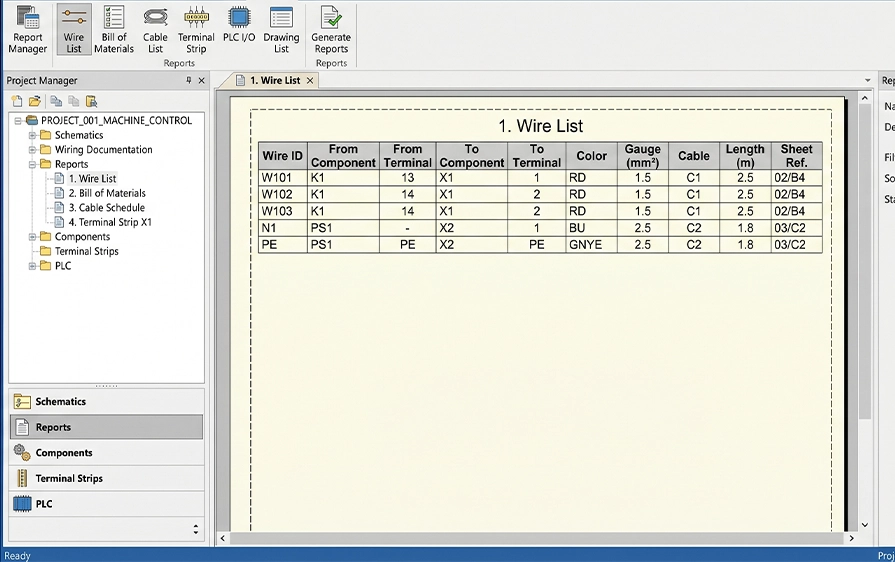
Manage wiring details, component data and project documentation more consistently. SOLIDWORKS Electrical helps users keep electrical information connected to the project, reducing manual duplication and documentation gaps.
Key points:
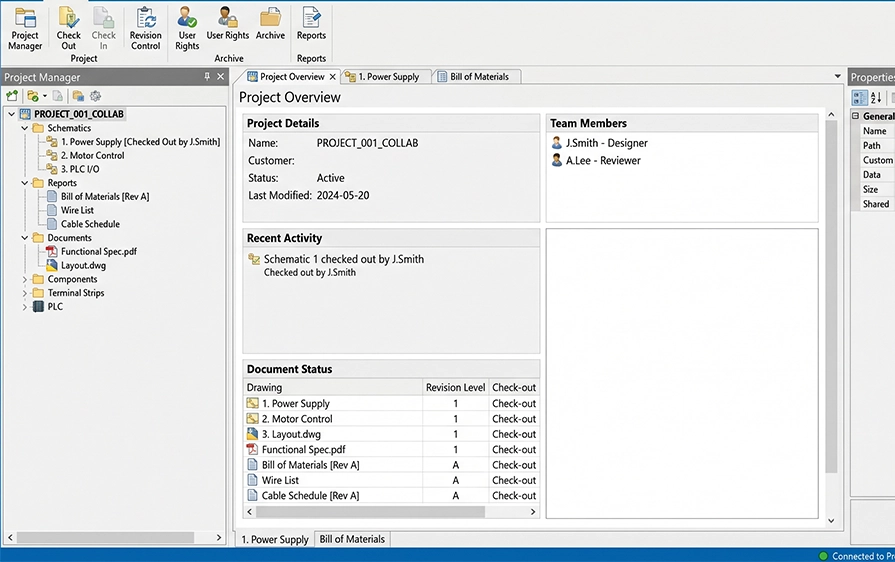
Electrical projects often involve multiple users, drawings and design changes. SOLIDWORKS Electrical supports more structured collaboration by helping teams work from shared project information and maintain clearer design records.
Key points:
SOLIDWORKS Electrical is useful for teams that need to design, document or manage electrical systems as part of product development. It supports applications where schematic accuracy, wiring information, component data and mechanical integration are important to the final product.
Create electrical schematics and wiring documentation for machines, panels, equipment and automated systems.
Support electrical design for products that include wiring, components, circuits or integrated electrical systems.
Help teams document electrical components, connections and design information for panel-related workflows.
Connect electrical design data with 3D routing and mechanical design context where wiring paths and physical layout matter.
Improve the quality and consistency of electrical drawings, component records and project reports.
Multiline Schematics
Mixed Schematics
2D Cabinet Creation
Electrical Component and Symbol Library
Design Reuse
Automated Terminal Drawing Creation
Automates Contact Cross-Referencing
Advanced Formula Manager
SOLIDWORKS Electrical Content Portal
Enhanced SOLIDWORKS PDM Connector
Report Generation
SOLIDWORKS Electrical Standard Functionality
Report Generation – Customized
Link to SOLIDWORKS 3D CAD
Common ECAD and MCAD Database
PLC Tools
Dynamic Connector Tools
Real-time Collaboration
Real-time Synchronization
Deferred Update Mode
Custom Part Library Classifications
Excel Automation
User Rights Management
Collaborative Electrical-Mechanical Development
Real-Time Synchronization
Electrical Design in 3D CAD
Auto-Routing
Electrical Harness Design Planning
Embedded Electrical System Design Planning
3D Electrical Cabinet Design
Electrical Component Library
Single-line Schematics
Multiline- Schematics
Mixed Schematics
2D Cabinet Creation
Electrical Component and Symbol Library
Design Reuse
Automated Contact Cross-Referencing
Advanced Formula Manager
Electrical Component and Symbol Library Management
SOLIDWORKS Electrical Content Portal
Linked to SOLIDWORKS 3D CAD
Common ECAD and MCAD Data base
PLC Tools
Dynamic Connector Tools
Real-Time Collaboration
SOLIDWORKS PDM Integration
Global Project Settings
Classifications
Manufacturer Part
Symbol Editor
Marks and Wire Management
Enhanced SOLIDWORKS PDM Connector
Multi-Level Terminals Strip Support
Distributed Mode
Collaborative Electrical Mechanical Development
Electrical design in 3D CAD
Auto Routing
Electrical Harness Design Planning
Embedded Electrical System Design Planning
3D Electrical Cabinet Design
SOLIDWORKS Electrical is a set of tools for creating electrical schematics, wiring documentation, and electrical design data in a structured way.
It helps teams define electrical interconnections for complex systems and keep documentation consistent as changes happen.
Cadmes offers four options:
SOLIDWORKS Electrical Schematic Standard covers the core schematic and documentation workflow, including: multiline and mixed schematics, 2D cabinet creation, component/symbol libraries, design reuse, automated terminal drawing creation, automated contact cross-referencing, formula management, content portal access, enhanced SOLIDWORKS PDM connector, and report generation.
SOLIDWORKS Electric Schematic Professional includes Standard functionality, then adds capabilities aimed at deeper control and collaboration, including: customised report generation, link to SOLIDWORKS 3D CAD, a common ECAD/MCAD database, PLC tools, dynamic connector tools, real-time collaboration and synchronisation, deferred update mode, Excel automation, custom library classifications, and user rights management.
SOLIDWORKS Electrical 3D is for planning and routing electrical systems inside 3D CAD, so electrical and mechanical work stays aligned.
It includes auto-routing, harness design planning, embedded electrical system planning, 3D electrical cabinet design, and a component library, with real-time synchronisation as part of the workflow.
A practical way to choose:
SOLIDWORKS Electrical Professional: best when both advanced schematics and 3D electrical routing must stay connected.
SOLIDWORKS publishes official minimum requirements online.
As a baseline, SOLIDWORKS lists x86_64 (Intel 64/AMD64) and 16 GB RAM (32 GB recommended) for SOLIDWORKS generally, and Electrical Schematic: 8 GB RAM (16 GB recommended).
Real performance still depends on project size and whether the workflow includes heavier 3D work.
Yes. Cadmes offers SOLIDWORKS Electrical training (schematics, wiring diagrams, and documentation workflows), and also offers SOLIDWORKS Electrical 3D training for 3D routing and related 3D electrical workflows.
Use the Request a Quote section on the SOLIDWORKS Electrical page and select the package you’re interested in (Schematic Standard, Schematic Professional, Electrical 3D, or Electrical Professional).
SOLIDWORKS Electrical gives teams the tools to create schematics, manage electrical documentation and connect electrical design with 3D product development workflows. Cadmes can help you choose the right licence, request pricing and implement the software in a way that supports your business.

