

SOLIDWORKS Design is an end-to-end 3D CAD environment built for everyday engineering work. It allows designers and engineers to create detailed parts, assemble complex products and generate production-ready drawings within a single, connected workspace.
The software is designed to feel intuitive while still offering the depth needed for professional projects. Cloud-connected services simplify sharing, feedback and data control, helping teams stay aligned as designs evolve.
Highlights:
Feature-based 3D modelling for parts and assemblies
Linked drawings and model-based annotations
Secure collaboration through cloud services
Predictable behaviour during design changes
Tools that support downstream manufacturing
SOLIDWORKS Design supports consistent, efficient workflows that help teams work faster and reduce unnecessary rework. The focus is on clarity, stability and ease of collaboration throughout the design process.
SOLIDWORKS Design provides stable modelling tools that respond cleanly as designs change. Features rebuild predictably, assemblies maintain their structure and design intent is preserved from early concepts through to final release.
Key points:
Robust parametric modelling
Clean updates when geometry changes
Stable handling of assemblies
Designed for real-world engineering use
The interface is organised for efficiency and ease of use. Engineers can customise toolbars, shortcuts and menus to suit their preferred workflow, helping them stay focused on design tasks rather than software navigation.
Key points:
Easy to learn and quick to adopt
Custom layouts and shortcuts
Clean, distraction-free workspace
Optimised for daily engineering tasks
SOLIDWORKS Design includes built-in cloud collaboration tools that allow teams to share models quickly and securely. Stakeholders can review designs in a browser, add comments and provide feedback without needing CAD software installed.
Key points:
Secure model sharing via links
Browser-based viewing and markup
Centralised feedback management
Faster design reviews
SOLIDWORKS Design brings together modelling, documentation and data control tools that support the entire product development cycle.
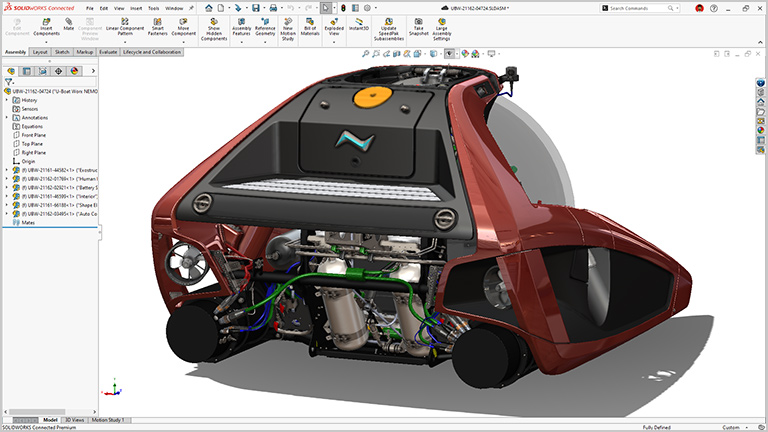
Design parts, build assemblies and produce drawings in one connected environment. As designs change, associated drawings and documentation update automatically, keeping everything aligned.
Key points:
Fast creation of parts and assemblies
Associative drawings and documentation
Built-in BOM functionality
Smooth handover to manufacturing
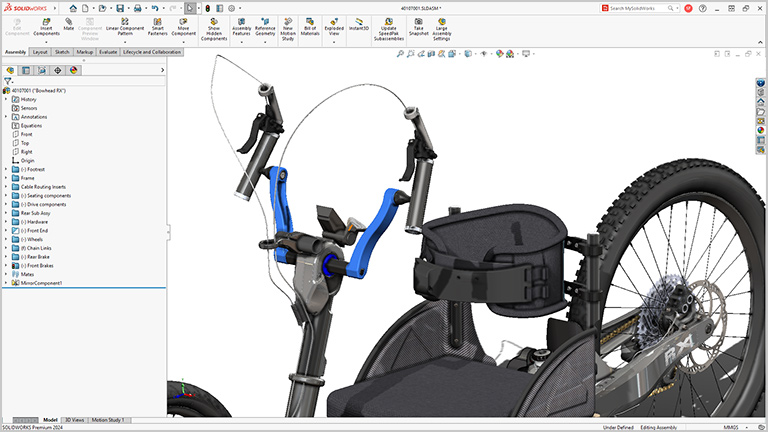
Specialised tools help reduce repetitive work and speed up common tasks. Sheet metal, weldments, routing and mould features follow established manufacturing workflows and standards.
Key points:
Industry-specific design tools
Standard hardware libraries
Automation for repetitive features
Smarter workflows with assistive intelligence

SOLIDWORKS Design supports both traditional 2D drawings and model-based definition using 3D annotations. Cloud-based review tools make it easy to gather clear, visual feedback from teams and suppliers.
Key points:
Production-ready drawings
GD&T and 3D annotation support
Online model reviews
Faster approval cycles

Cloud-connected data management tools help maintain file relationships and track design changes. This reduces the risk of lost references or overwritten work and keeps teams working on the correct revision.
Key points:
Maintains part-assembly relationships
Clear version history
Reduced risk of data conflicts
Secure access to design data
Cloud Now is licensed to the user rather than a specific device. It installs from the cloud and allows access across multiple machines, with built-in connectivity to cloud services.
Key points:
Named-user licensing
Access across multiple devices
Cloud installation and updates
Quarterly or annual terms
Cloud Ready installs locally on a specific workstation or network. Cloud features can be enabled when required, making it suitable for fixed environments or shared setups.
Key points:
Local installation
Device-based or floating licences
Optional cloud connectivity
Term or perpetual licensing
SOLIDWORKS Design is a professional 3D CAD (computer-aided design) software used to create parts, assemblies, and detailed engineering drawings.
It helps engineers and designers bring product ideas to life and prepare them for manufacture.
You can sketch, model, assemble and document products all in one platform.
SOLIDWORKS Design lets you create detailed 3D models, build assemblies with relationships between parts, and generate production-ready drawings from your designs.
Yes. SOLIDWORKS Design is known for its intuitive interface and predictable modelling behaviour, which make it approachable for new users while still powerful enough for advanced designers.
There are many learning resources and structured courses available.
Yes. SOLIDWORKS Design supports robust modelling capabilities for both simple and complex geometry, including large assemblies, sheet metal parts, weldments, and multi-component systems.
Yes. You can create detailed 2D or 3D drawings directly from your models. These drawings remain associated with the 3D design so updates in the model automatically refresh the documentation.
Yes. With cloud-enabled features, SOLIDWORKS Design allows teams to share designs, review feedback in real time, and manage revisions securely, helping teams stay aligned across locations.
Yes. SOLIDWORKS Design integrates with other SOLIDWORKS solutions like simulation, rendering, CAM, and data management. This helps you streamline workflows from design through analysis and manufacturing.
Yes. Cadmes offers a range of structured SOLIDWORKS Design training courses to help users build core skills and advance their modelling abilities:
These courses help learners progress from essential skills to advanced modelling, improving productivity and confidence with SOLIDWORKS Design tools.
Yes. Cadmes offers local technical support to help with installation, setup, troubleshooting, and general SOLIDWORKS Design questions so teams can stay productive.
Yes. Cadmes can advise on the best SOLIDWORKS Design licence and deployment options based on your team’s needs and workflow, whether you need cloud-connected access or a traditional installed licence.
Buying SOLIDWORKS Design through Cadmes gives you access to local expertise, training, and ongoing support. This helps ensure you use the software effectively and get the most value from your investment.
SOLIDWORKS Design gives engineering teams the tools they need to design accurately, collaborate efficiently and deliver production-ready results. CADMES is here to help you implement the software in a way that supports your goals and workflows.

