

SOLIDWORKS Visualize is rendering software used to create high-quality images, animations and visual content from 3D CAD data. It helps designers, engineers, marketing teams and product teams communicate design concepts, product details and presentation visuals more effectively.
Instead of waiting for physical prototypes or product photography, teams can use SOLIDWORKS Visualize to create realistic visual assets earlier in the development process. This supports design reviews, sales presentations, marketing material, product launches and customer communication.
Highlights:
Product visuals are often needed before a product is manufactured, photographed or released. SOLIDWORKS Visualize helps teams create realistic renders and animations earlier, making it easier to review designs, communicate ideas and prepare product content before physical assets are available.
SOLIDWORKS Visualize helps users create photorealistic images from 3D CAD data. This allows teams to show products, materials, finishes and design intent in a more polished and realistic way.
Key points:
Product teams do not always have to wait for prototypes or photography before showing a design. SOLIDWORKS Visualize helps users create visual content earlier in the development process, supporting faster design reviews and clearer communication.
Key points:
High-quality product visuals can support brochures, websites, presentations, campaigns and product launches. SOLIDWORKS Visualize helps teams create professional content directly from CAD data.
Key points:
SOLIDWORKS Visualize includes tools for turning 3D CAD data into high-quality visual content. These capabilities help teams create product images, animations and presentation assets that communicate design intent clearly.
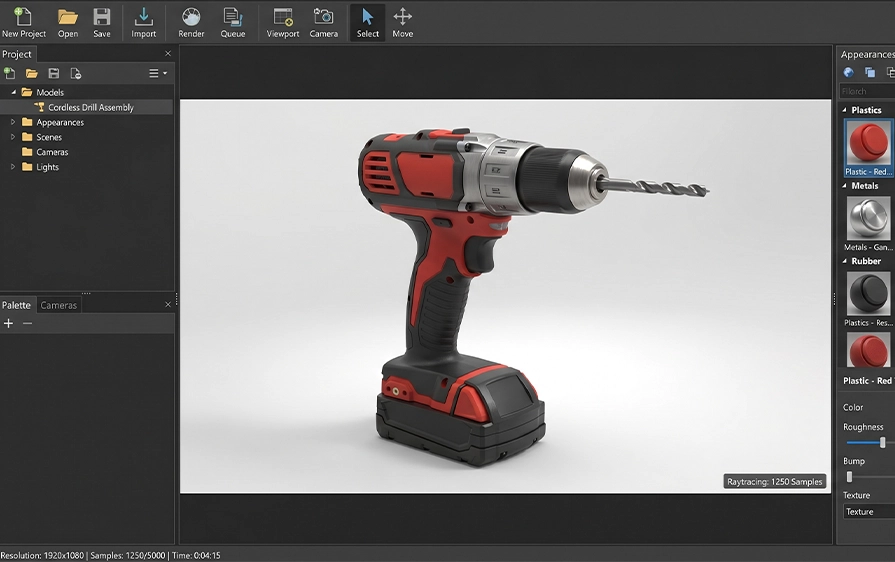
Create realistic product images using CAD geometry, materials, lighting and camera settings. SOLIDWORKS Visualize helps teams produce professional renders that show what a product could look like in real-world conditions.
Key points:

Create animations that show product movement, assembly sequences or design features. This helps teams explain how a product works, how components interact or how a design should be presented to customers and stakeholders.
Key points:

Compare different materials, colours, textures and finishes before physical samples are available. This helps teams review product appearance and make visual decisions earlier in the design process.
Key points:
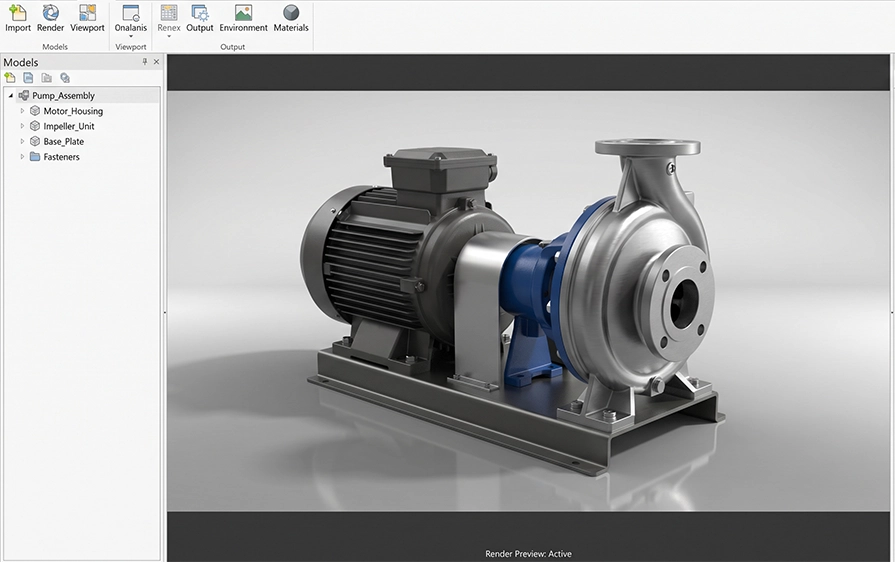
Use 3D CAD data as the foundation for product visuals instead of recreating the design in separate visualisation tools. This helps teams work from existing engineering data and create more consistent product communication.
Key points:
SOLIDWORKS Visualize is useful for teams that need realistic product images, animations and visual communication assets. It supports design, engineering, sales, marketing and product communication workflows where clear visuals help people understand a product before it is physically available.
Create polished visuals for internal reviews, customer presentations and product discussions.
Produce product images for brochures, websites, campaigns and sales presentations.
Show product appearance, material choices and design direction more clearly during review stages.
Create visual assets before physical product photography is available.
Use images and animations to explain product features, assemblies or operating concepts.
Graphics Processing Unit (GPU) Accelerates Rendering
Hybrid Render Mode
Physically-Based Raytracing
Intuitive User Interface
CAD and Graphic File Support
CAD live-Update
Surface/Part Splitter
Interactive Depth of Field
Artificial Intelligence (AI) Denoiser
Advanced Material Support with NVIDIA MDL and PBR
Decals (Interactive Stickers)
Custom Keyboard Shortcuts
Automatic Data Recovery
XR Report for AR/VR experiences
Support for Hight-resolution displays (4K monitors and beyond)
SOLIDWORKS PDM integration
SOLIDWORKS Visualize Standard functionality
Import SOLIDWORKS Animation and Motion Studies
Full Animation Suite
Animation Ribbon
Visualize Support
Power Boost real-time Networking Rendering
Browser-based Interactive Image and Panoramic Outputs
Customisable Photographic Camera Filters
Integrated Render Queue
Configurations
New Area Lights and Light Placements
Create VR Content Integrated Physics
Integrated Physics Engine
Vehicle Driving Simulator
Video Decals
IES Light Profiles
Increase Rendering Efficiency
Create Render Farm
Manage Your Render Farm
Unleash the Raw Power of Super-Feature Power Boost
SOLIDWORKS Visualize is a photo-realistic rendering and visualisation tool that turns 3D CAD models into high-quality images, animations, and interactive visuals.
It is commonly used to present products clearly before anything is manufactured
You can create realistic still images, product animations, exploded visuals, 360-degree views, and immersive visual content.
These outputs are often used for presentations, websites, brochures, and client approvals.
SOLIDWORKS Visualize is used by designers, engineers, and marketing teams who need clear, realistic visuals.
It helps people understand how a product will look without needing a physical prototype.
There are two main versions. SOLIDWORKS Visualize Standard focuses on creating high-quality rendered images, while SOLIDWORKS Visualize Professional adds advanced animations, interactive outputs, and immersive visual content.
SOLIDWORKS Visualize works directly with SOLIDWORKS CAD models. You can bring your design geometry into Visualize and use it to create visuals without rebuilding models or converting files.
Yes. Many companies use SOLIDWORKS Visualize to create marketing images, animations, and promotional visuals. It often reduces the need for physical photoshoots during early product stages.
Yes. SOLIDWORKS Visualize is designed to be approachable, even for users new to rendering. With basic training and practice, users can produce professional-looking visuals relatively quickly.
Yes. Cadmes offers SOLIDWORKS Visualize Training, which teaches users how to create realistic renders, animations, and visual content from CAD models for design communication and marketing use.
Yes. Cadmes provides local technical support to assist with installation, setup, and everyday questions related to using SOLIDWORKS Visualize effectively.
Yes. Cadmes can help teams integrate SOLIDWORKS Visualize into their design and communication workflows so visuals are created efficiently and consistently from CAD data.
Buying SOLIDWORKS Visualize through Cadmes gives you access to local expertise, structured training, and ongoing support, helping you get real value from your visualisation workflows.
SOLIDWORKS Visualize helps teams create photorealistic renders, animations and product visuals from 3D CAD data. Cadmes can help you choose the right licence, request pricing and implement SOLIDWORKS Visualize in a way that supports your design, sales or marketing workflow.
