

SOLIDWORKS CAM is integrated CAM software that helps users prepare parts for CNC machining from within the SOLIDWORKS environment. It allows design and manufacturing teams to work more closely by connecting machining preparation directly to the 3D model.
The software supports CNC programming, machining strategy preparation and manufacturing workflows that rely on accurate design data. By using SOLIDWORKS CAM, teams can reduce the disconnect between design intent and production planning, helping manufacturers prepare work more efficiently before parts reach the shop floor.
Highlights:
Manufacturing teams often lose time when design information has to be recreated, transferred or interpreted again before machining. SOLIDWORKS CAM helps reduce that gap by allowing CNC preparation to happen closer to the design model, making it easier to move from engineering to production.
SOLIDWORKS CAM helps teams work from the same model used during design. This creates a stronger connection between engineering intent and manufacturing preparation, reducing the need to rebuild information in separate workflows.
Key points:
Machining preparation can begin earlier in the product development process. SOLIDWORKS CAM helps users review manufacturability and prepare machining strategies before design information is handed over too late in the workflow.
Key points:
Consistent CAM workflows help teams reduce manual interpretation and improve repeatability. SOLIDWORKS CAM supports a more structured approach to machining preparation, helping businesses standardise how CNC work is planned.
Key points:
SOLIDWORKS CAM includes tools that support machining preparation directly inside SOLIDWORKS. These capabilities help users move from product design to CNC programming with clearer design data, better manufacturing context and a more connected workflow.
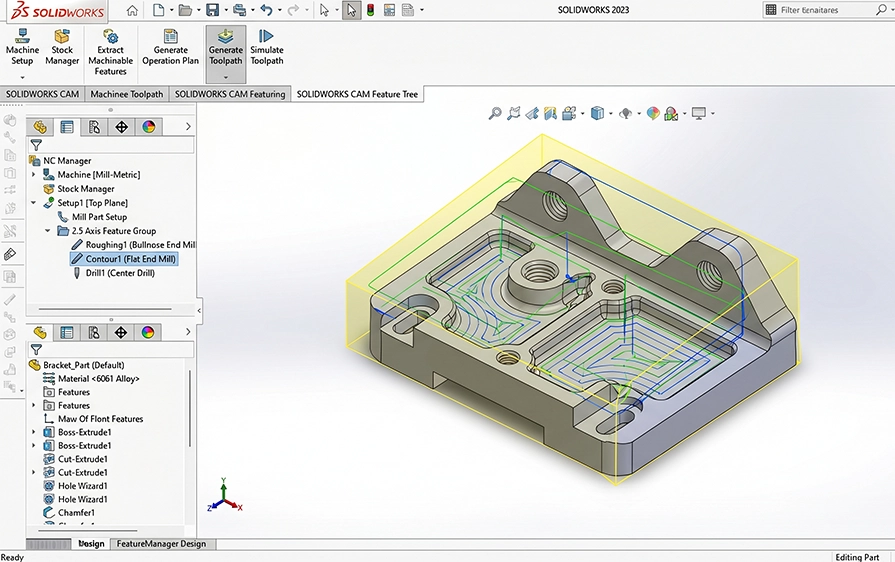
Work with CAM tools inside the SOLIDWORKS environment so design and manufacturing preparation can remain more closely connected. This helps reduce unnecessary file transfer, duplicated setup and disconnected decision-making.
Key points:

Prepare machining operations and CNC-related data from the SOLIDWORKS model. SOLIDWORKS CAM supports users who need to turn design geometry into manufacturing instructions for machining workflows.
Key points:
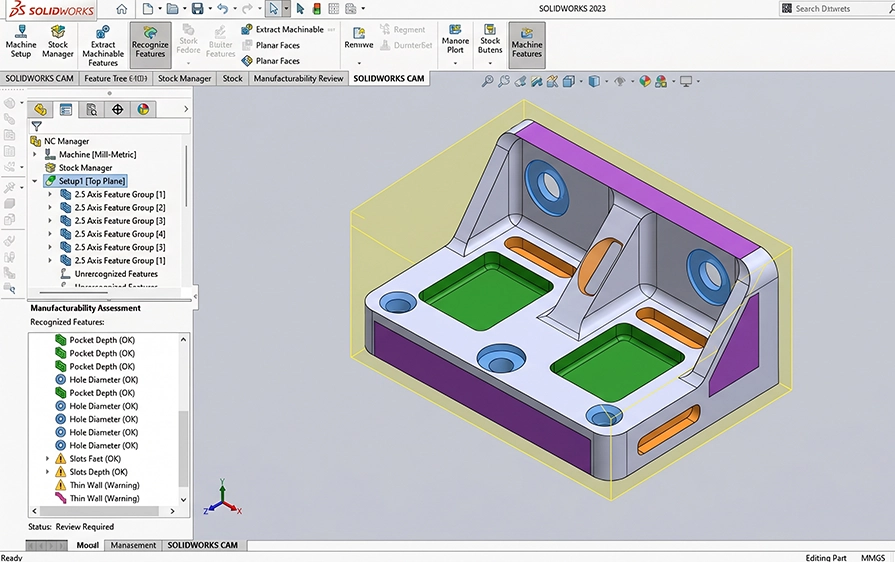
Evaluate parts with machining in mind before production begins. SOLIDWORKS CAM helps users consider how geometry, features and manufacturing requirements affect machining preparation.
Key points:
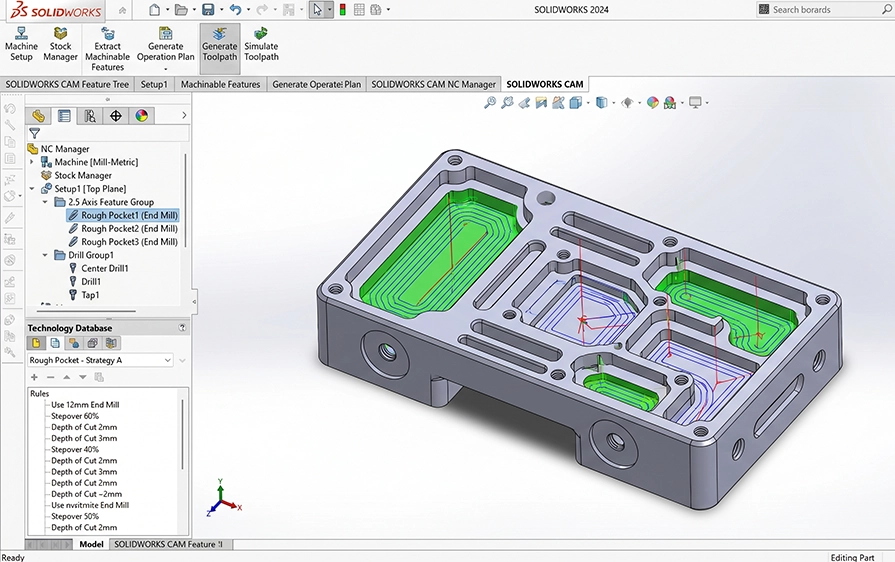
SOLIDWORKS CAM includes knowledge-based machining capabilities that help standardise machining strategies and apply repeatable manufacturing rules. This supports more consistent programming and helps teams capture machining knowledge.
Key points:
SOLIDWORKS CAM is useful for businesses that need to connect product design with CNC machining preparation. It supports teams that create machined components, prepare manufacturing workflows, review manufacturability or want a more connected CAD/CAM process.
Prepare CNC machining workflows for parts designed in SOLIDWORKS.
Reduce workflow gaps between engineering design and machining preparation.
Support earlier planning for machining operations and production requirements.
Use design features to support more structured machining preparation.
Help teams apply consistent machining strategies across similar parts and projects.
Rules-Based Machining
Tolerance-based Machining (TBM)
Knowledge-based Machining (KBM)
Associativity with SOLIDWORKS 3D CAD
Automatic Feature Recognition (AFR)
SOLIDWORKS CAM Standard Functionality
3 + 2 Programming
High-speed Machining (HSM)
Turning Capabilities
SOLIDWORKS CAM Standard Functionlity
Part Modelling/Import
SOLIDWORKS CAM Standard and Professional Functionality
Part Modelling/Import
Assembly Modelling/Import
SOLIDWORKS CAM is a CNC programming tool that works inside SOLIDWORKS.
You design the part in SOLIDWORKS and then create the machining toolpaths without leaving the software.
This keeps design and manufacturing closely linked and avoids unnecessary back-and-forth.
Yes. SOLIDWORKS CAM is fully integrated. You do not need to export files or open a separate CAM system.
When the design changes, the machining setup updates automatically, which helps prevent errors.
SOLIDWORKS CAM supports 2.5-axis and 3-axis milling.
This covers common CNC work such as drilling holes, machining pockets, cutting profiles, facing surfaces, and tapping threads.
Yes. SOLIDWORKS CAM can automatically identify features like holes, pockets, and slots from the model.
This means you do not need to define every feature manually, which speeds up programming.
Yes. SOLIDWORKS CAM generates G-code using post processors that are matched to your CNC machine and controller.
This ensures the output code is suitable for running on the machine.
Yes. SOLIDWORKS CAM is relatively easy to learn, especially for users already familiar with SOLIDWORKS.
The software guides you through the process using features and machining rules, rather than starting from scratch every time.
Knowledge-based machining allows you to define how certain features should be machined and reuse those rules on future parts.
Once set up, the software applies the same logic automatically, which helps keep results consistent.
Yes. SOLIDWORKS CAM runs inside SOLIDWORKS, so you need a compatible SOLIDWORKS licence.
The level of CAM functionality available depends on your licence and setup.
Yes. Cadmes offers SOLIDWORKS CAM training focused on practical CNC use. Training covers feature recognition, toolpath creation, machining strategies, and everyday best practices.
Yes. Cadmes provides local technical support, helping users with setup questions, machining issues, and general troubleshooting. Support is handled by a local team familiar with real manufacturing environments.
Yes. Cadmes assists with setting up SOLIDWORKS CAM correctly from the start.
This includes configuration, machining rules, and guidance on how to structure CAM workflows.
Buying SOLIDWORKS CAM through Cadmes means you get local support, training options, and practical guidance.
This helps ensure the software is used properly and delivers real value on the shop floor.
SOLIDWORKS CAM helps teams bring design and manufacturing closer together through integrated CAM tools inside SOLIDWORKS. Cadmes can help you choose the right licence, request pricing and implement SOLIDWORKS CAM in a way that supports your CNC workflow.

