

SOLIDWORKS Flow Simulation is a CFD analysis tool that helps users study how liquids, gases and heat behave around or inside a design. Because it works inside SOLIDWORKS, engineers can test design performance without leaving their CAD environment or rebuilding geometry in a separate simulation tool.
The software is used to evaluate airflow, cooling, pressure drop, temperature behaviour, fluid movement and heat transfer during the design process. This helps teams identify performance issues earlier, compare design options more clearly and reduce the risk of discovering flow or thermal problems too late.
Highlights:
SOLIDWORKS Flow Simulation helps engineering teams understand how design decisions affect real-world performance. Instead of waiting for a physical prototype to reveal cooling, airflow, pressure or thermal issues, users can run simulation studies earlier and make design improvements while changes are still easier to manage.
SOLIDWORKS Flow Simulation allows users to test how liquids or gases move through and around a product. This helps engineering teams evaluate flow paths, pressure changes, turbulence and velocity before committing to a final design.
Key points:
Thermal behaviour can affect reliability, efficiency and product lifespan. SOLIDWORKS Flow Simulation helps users study heat transfer, cooling strategies and temperature distribution so thermal risks can be identified earlier in development.
Key points:
Physical testing remains important, but simulation can help reduce avoidable trial-and-error. By testing flow and thermal performance digitally, teams can refine designs before prototyping and approach physical testing with more confidence.
Key points:
SOLIDWORKS Flow Simulation includes tools for evaluating fluid behaviour and thermal performance across a wide range of engineering applications.
It helps users understand how design geometry, operating conditions and environmental factors affect product performance.

Analyse flow inside pipes, ducts, valves, manifolds, enclosures and other internal systems, or study airflow and fluid behaviour around external product surfaces. This helps teams understand how geometry affects flow movement, pressure and efficiency.
Key points:

Study how heat moves through a design and how cooling strategies affect temperature behaviour. SOLIDWORKS Flow Simulation can help evaluate conduction, convection and heat transfer effects so users can improve thermal performance earlier.
Key points:

Visualise simulation results using plots, flow trajectories and result data that help users understand pressure, velocity and temperature changes across the model. This makes it easier to identify restrictions, hot spots, inefficient flow paths or areas that need design refinement.
Key points:
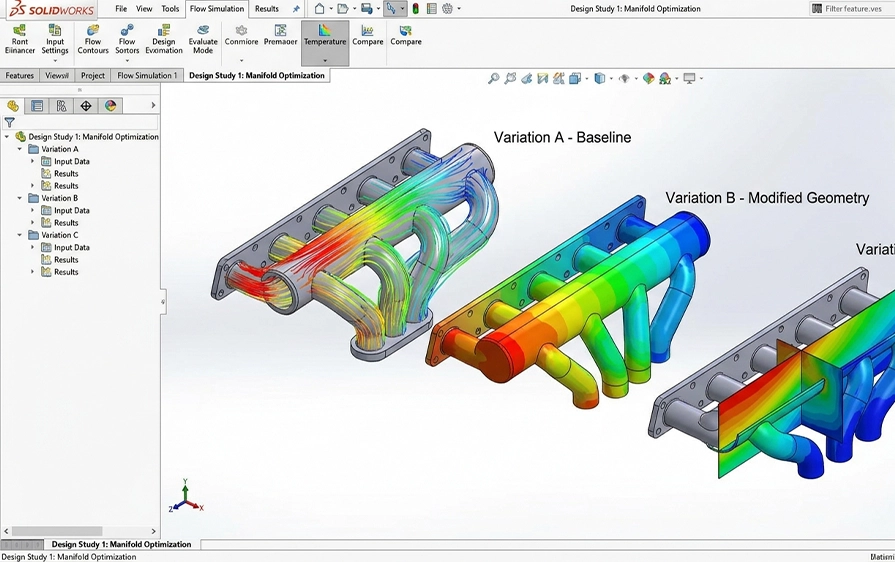
Compare different design options before manufacturing or prototyping. Engineers can adjust geometry, boundary conditions or operating requirements and review how each change affects flow and thermal performance.
Key points:
SOLIDWORKS Flow Simulation is useful for teams that need to understand fluid movement, airflow, cooling, pressure drop or heat transfer as part of the design process. It supports engineering applications where product performance depends on how liquids, gases or thermal energy behave under operating conditions.
Evaluate how heat moves through a product and how design changes affect cooling performance.
Study flow behaviour, pressure drop and restrictions inside fluid systems.
Analyse airflow, heat build-up and cooling strategies for enclosed systems.
Understand pressure, velocity and flow paths through mechanical fluid-handling components.
Evaluate airflow around product surfaces, vehicles, equipment or exposed components.
Ease of Use
Design Data Reuse
Multi-Parameter Optimisation
SOLIDWORKS Flow Simulation Capabilities
Material Database
Internal
External
2D – 3D
Heat Conduction in Solids
Gravity
Rotation
Free Surface
Symmetric
Gases
Liquids
Boundary Layer Description
Mixing Flows
Non Newtonian Fluids
Flow Condition
Wall Conditions
Porous Components Visualisation
Results Customisation
Communication & Reporting
Two-Phase (Fluid + Particles) Flows
Noise Prediction
Ease of use
Multi-Parameter
Material Database
Internal
External
2D – 3D
Heat Condition in Solids
Gravity
Symmetric
Boundary Layer Description
Flow Conditions
Wall Conditions
Porous Components
Visualisation
Results Customisation
Communication & Reporting
Two-Phase (Fluid + Particles) Flow
HVAC Conditions
Tracer Study
Comfort Parameters
Ease of use
Multi-Parameter
Material Database
Internal
External
2D – 3D
Heat Condition in Solids
Gravity
Symmetric
Boundary Layer Description
Flow Conditions
Wall Conditions
Porous Components
Visualisation
Results Customisation
Communication & Reporting
Two-Phase (Fluid + Particles) Flow
Electronic Conditions
SOLIDWORKS Flow Simulation is most effective when users understand how to set up studies correctly, define boundary conditions, interpret results and apply findings to design decisions. Cadmes can recommend training options that help users build confidence with simulation workflows.
SOLIDWORKS Flow Simulation is a computational fluid dynamics (CFD) tool that lets you simulate how liquids and gases behave inside and around your designs.
It helps you understand fluid flow, pressure, heat transfer, and performance before building physical prototypes.
SOLIDWORKS Flow Simulation can help solve real-world engineering problems like airflow over a surface, cooling and heating performance, fluid mixing, and pressure drops.
This makes it useful in applications like HVAC, electronics cooling, pumps, and aerodynamic design.
SOLIDWORKS Flow Simulation runs as an add-in inside SOLIDWORKS, so you can simulate directly on the same 3D models you design without exporting or converting files.
This keeps your workflow efficient and accurate.
You can analyse fluid flow around objects (external flow), internal flow through channels and ducts, heat transfer between fluids and solids, and multiphase flow scenarios where more than one fluid interacts.
SOLIDWORKS Flow Simulation is designed to be accessible to users with a SOLIDWORKS background.
There is a learning curve, but structured training and practice help users start running useful simulations quickly.
Using SOLIDWORKS Flow Simulation helps you validate designs early, reduce prototype costs, optimise performance, and gain insights into fluid behaviour, thermal effects, and pressure distribution before physical testing.
Yes. SOLIDWORKS Flow Simulation can simulate heat transfer between solids and fluids, helping you understand cooling and heating performance and apply design changes when needed.
Yes. Cadmes offers SOLIDWORKS Flow and Advanced Simulation Training, which teaches how to set up and run fluid flow and thermal simulations, interpret results, and apply insights to design improvements.
Yes. Cadmes provides local technical support to help you with setup, solver settings, result interpretation, and workflow questions related to SOLIDWORKS Flow Simulation.
Yes. Cadmes can help your team incorporate SOLIDWORKS Flow Simulation into your product development process so fluid and thermal performance analysis becomes a regular part of design validation.
Buying SOLIDWORKS Flow Simulation through Cadmes gives you access to local expertise, structured training, and ongoing support, which helps ensure you get reliable insights from your simulations and make better design decisions.
SOLIDWORKS Flow Simulation gives engineering teams the tools to analyse flow, heat transfer and thermal performance earlier in the design process. Cadmes can help you choose the right licence, request pricing and implement the software in a way that supports your workflow.


